
Handyman software
Best Software for Handyman Businesses: Built for Small Jobs
Handyman work is lots of small, varied jobs, and the admin per job is what hurts. What software should fix, and which tools fit.
 9 min read
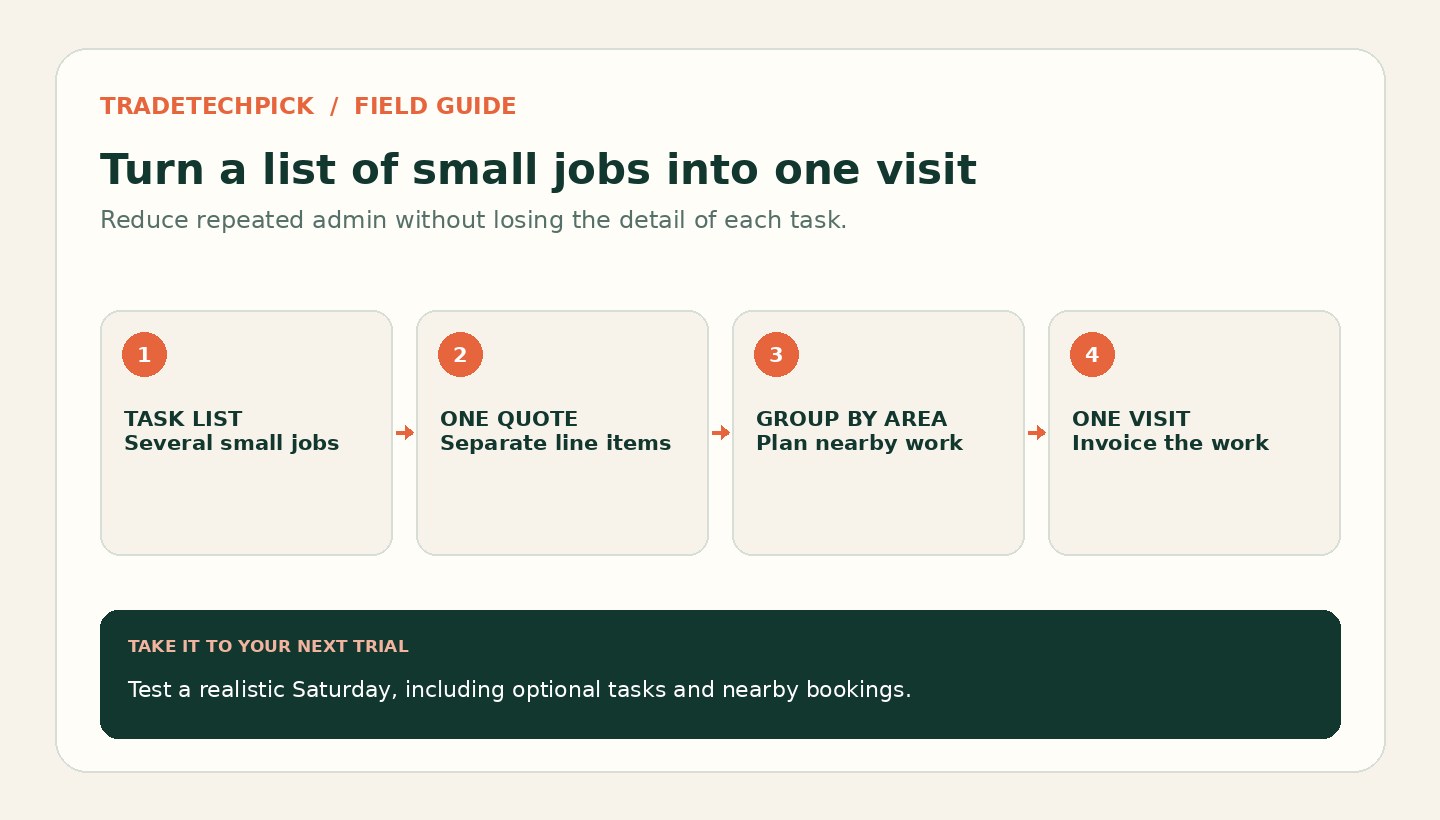
Handymen rarely get one job. They get a list: put up two shelves, sort the sticking back door, replace a tap washer, mount the TV. Handled one way, that's four quotes, four visits and four invoices. Handled another, it's one quote, one morning and one invoice.
That difference is the whole story of handyman software. Other trades worry about big jobs going wrong. A handyman's quiet problem is the opposite: lots of small jobs, each carrying the same quoting, travel and invoicing effort as a large one. Once you see why that overhead hurts, it's clear what software should do about it, and which tools fit.
Why the small job is the expensive one
Driving to a customer, pricing the work, booking it in and chasing the invoice take roughly the same time whether the job is worth £40 or £400. On a big job, that overhead disappears into the total. On a small one, it can eat most of what you earn.
So the best handyman software isn't the one with the longest feature list. It's the one that cuts the effort per job, in four specific ways.
1. Quote a list, not a job
Customers rarely have one small job. They have a list. Your software should let you put several tasks on one quote, priced separately, so the customer can see each item and approve the lot in one go.
Housecall Pro's handyman page describes scheduling "punch list" tasks alongside repairs and installations, and building estimates that pull in flat-rate prices, labour and material costs. Jobber includes quoting from its Core plan, and adds optional line items the customer can tick on or off on its Grow plan, which is useful for "and while you're there" extras.
2. Price your common tasks once
If you're working out the price of a shelf fitting from scratch every time, you're doing unpaid work. A price book holds your standard tasks with a fixed price and an expected time, so a quote becomes picking items rather than doing sums.
Start with your top twenty tasks. Add a minimum charge per visit, so the smallest jobs still cover the drive. Housecall Pro includes a price book on its Basic plan and adds flat-rate pricing on Essentials.
3. Let the simplest tasks book themselves
Some handyman tasks can be priced without a visit: a TV mount of standard size, a flat-pack assembly, a curtain pole. Those can go straight online, which skips the quote entirely. Anything where the price depends on what you find should stay as a request instead.
Housecall Pro's handyman page describes a booking page where you set services, prices and coverage areas, and Jobber includes online booking on Core. Our online booking guide has a four-question test for deciding which tasks belong online.
4. Group jobs by area
Two small jobs on the same street are profitable. The same two jobs at opposite ends of town may not be. Scheduling that shows jobs on a map, or plans routes, lets you group work by area and offer customers nearby slots first.
The catch: job limits hit handymen hardest
Here's something general software guides rarely point out. Some plans cap how many jobs you can create each month, and a handyman creates far more jobs than most trades for the same income.
ServiceM8's UK Free plan allows 30 new jobs a month, and its £25 Starter plan allows 50. For a plumber doing a few larger jobs a week, those limits can be comfortable. For a handyman doing several small jobs a day, 50 can run out within a few weeks. If you consider a job-limited plan, count your jobs in a busy month first, and remember that four tasks on a single job use one job from the allowance, not four. That's another reason to quote lists.
Plans priced per user work differently. Tradify's UK Lite plan is priced at £34 per user a month rather than by job volume, so check its plan limits, but the job count isn't what sets the price.
Solo in the US, solo in the UK, or a small team
The solo handyman, US-based. Jobber Core is listed at $29 a month on annual billing and covers quotes, online booking, invoicing and online payments. Housecall Pro Basic, at $59, adds a price book and job costing, which helps you spot which small jobs actually pay. Jobber also lists a Home Depot integration for quoting with current product prices and local stock, useful if you buy materials there.
The solo handyman, UK-based. Compare Tradify Lite at £34 per user a month with ServiceM8, and check ServiceM8's job allowance against your busiest month. Both publish UK pricing in pounds. Housecall Pro's pricing is written for US businesses, so confirm UK support before trialling it.
A small handyman team. Jobber Connect for five users is listed at $149 a month on annual billing, the same as Housecall Pro Essentials for five users. Our Jobber vs Housecall Pro comparison breaks down what each gives you at that price.
Count the taps on a realistic Saturday
Don't test with one big job. Test with a realistic Saturday:
- Build one quote with four small tasks from your price book.
- Add an optional extra the customer can choose.
- Put one fixed-price task on your online booking page and book it yourself.
- Schedule three jobs in the same area on one morning.
- Invoice all of them from your phone.
Then count how many taps it took. For a business built on small jobs, that number matters more than anything on the feature list.
For the money side, our job costing guide shows how to check which small jobs are worth taking, and our solo tradespeople guide covers the basics of choosing on a budget.
Sources
Checked 28 September 2026 against official product and pricing pages. ServiceM8 and Tradify UK prices come from their UK pricing pages as used across this site; confirm current limits and prices before you buy.