
Cost guide
Affordable Field-Service Software: Costs for 1–10-Person Businesses
The number on the pricing page is only where the story starts. Here's how to work out what you'll really pay in your first year.
 9 min read
Pricing pages are written to be read in ten seconds. "From about $33 (£25) a month" or "$29 a month" is the line that gets you into the free trial. What it can't tell you is what happens to the bill the day you hire your first apprentice, turn on card payments, or find that the feature you need sits one plan up.
This guide follows that bill in the order you'll meet it. We start with the thing that surprises people most, which is what a price is actually counting. Then we go through the seven costs that make up a real first-year total, look at a fictional example where the cheaper option in year one turns out not to be cheaper for long, and finish with the questions to put to any provider. You'll leave with a formula you can reuse on any product.
Currency note. Converted prices are approximate USD estimates based on the European Central Bank reference rates for 25 September 2026, when 1 GBP ≈ $1.33. Original GBP prices are shown in brackets. Estimates are rounded to the nearest dollar. Exchange rates and card-provider rates change, so check the vendor's current billing currency, tax or VAT treatment and checkout total before buying.
What is the price actually counting?
Every product prices something, and it isn't always people. Once you spot the unit, a pricing page becomes much easier to read.
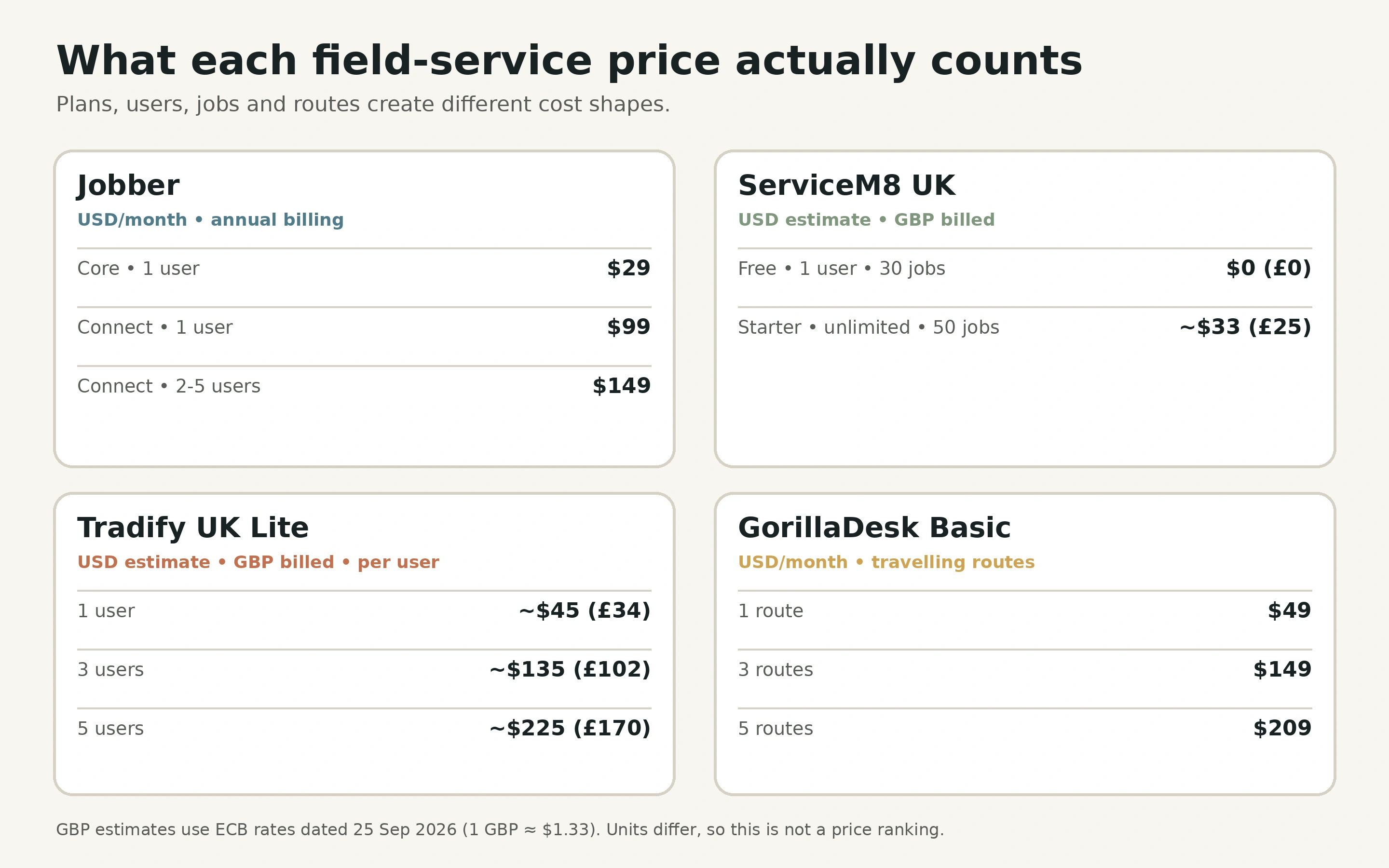
The prices published by the products we cover show three different units:
- Per user. Tradify's UK plans charge about $45 (£34) for Lite to about $58 (£44) for Plus, per user per month. Simple, and it rises with every person.
- By plan and team-size band. Jobber shows Core at $29 a month for one user. On annual billing, Connect starts at $99 for one user and costs $149 a month for two to five users.
- By usage. ServiceM8's UK Starter plan is about $33 (£25) a month for unlimited users but allows 50 new jobs a month. GorillaDesk prices by route, at $49 for one route, $149 for three and $209 for five, and a route isn't the same as a login.
Here is the same growing business at one, three and five people, using those published figures:
| Team size | Jobber | ServiceM8 UK | Tradify UK Lite | GorillaDesk Basic |
|---|---|---|---|---|
| 1 person | $29/month (Core) | $0 (£0) Free, 30 jobs, or about $33 (£25) Starter | About $45 (£34)/month | $49/month (1 route) |
| 3 people | $149/month (Connect) | About $33 (£25)/month (Starter, 50 jobs) | About $135 (£102)/month | $149/month (3 routes) |
| 5 people | $149/month (Connect) | About $33 (£25)/month (Starter, 50 jobs) | About $225 (£170)/month | $209/month (5 routes) |
These USD-primary prices use different billing units, so this is not a ranking. The bracketed GBP figures are the prices the UK vendors publish. Tradify climbs steadily with every hire. Jobber changes by plan and team-size band. ServiceM8 stays flat until the job allowance becomes the limit. A low monthly price can turn expensive when every field worker needs a seat, and a higher account price can be wasteful if you only use a fraction of it. Neither conclusion is visible from the headline.
The seven costs that make up a real first-year total
Once you know the unit, you can build the full picture. There are seven categories, and the first year is the sum of all of them.
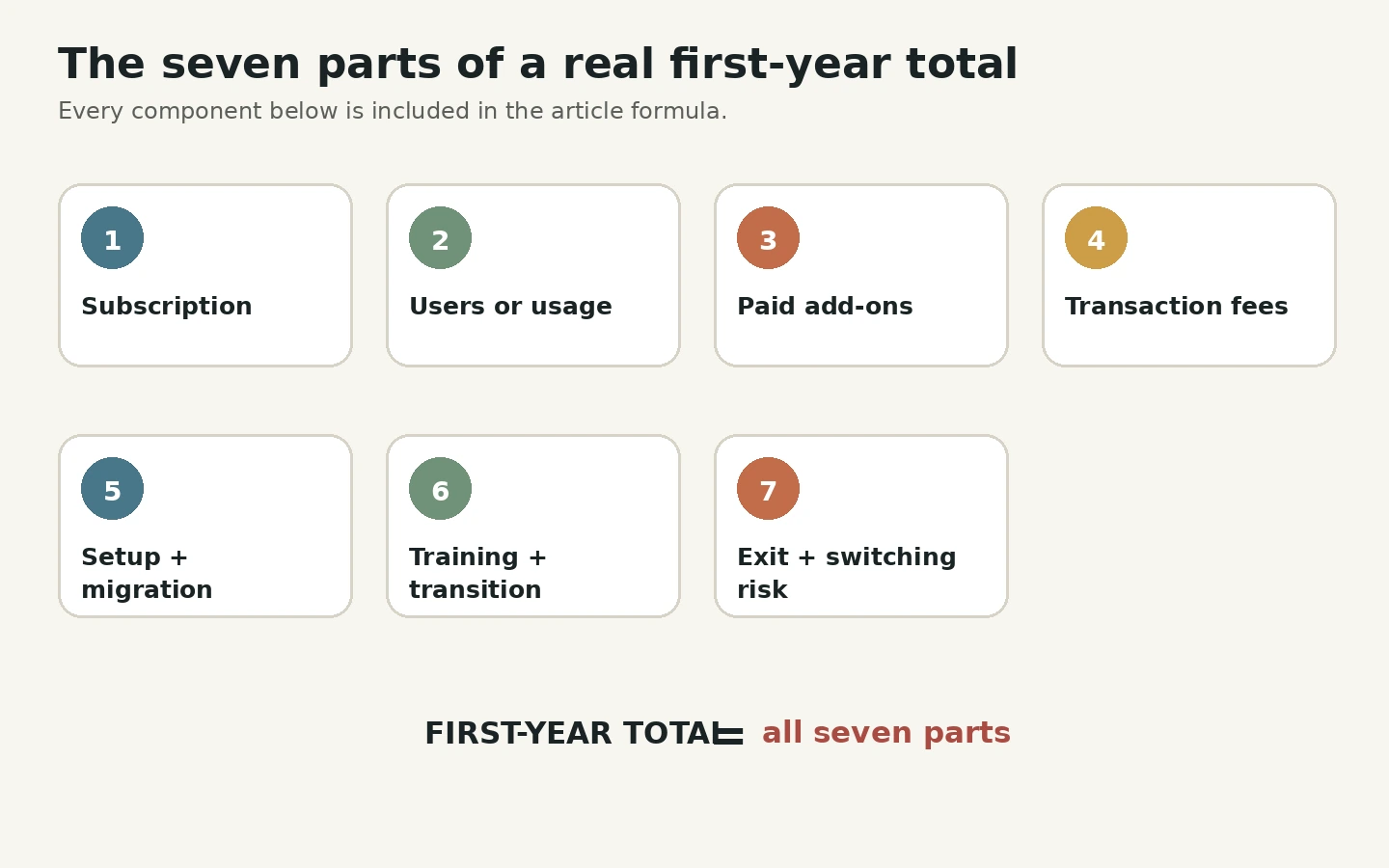
1. Base subscription. Record the plan that includes the features you need, not the cheapest advertised tier. Note the billing period and tax.
2. Users, jobs or usage. Identify the pricing unit, then calculate the cost at today's level and at a plausible higher one.
3. Paid add-ons. List integrations, forms, phone features, advanced reporting, storage, automation and premium support separately. Small add-ons are easy to forget and hard to remove later.
4. Transaction and communication fees. Card payments, SMS, phone numbers, maps or document delivery may carry usage fees. These follow your turnover, not your team size. As a hypothetical example, if customers pay about $26,505 (£20,000) a month by card, every single percentage point of processing fee costs about $265 (£200) a month, or $3,181 (£2,400) a year. A fee that looks tiny on the pricing page can end up larger than the subscription.
5. Setup and migration. Include onboarding fees, plus the internal time spent cleaning data, configuring services, creating templates and setting permissions.
6. Training and transition. Estimate the hours for office and field users, plus any period where you're entering things twice.
7. Exit and switching risk. Check export formats, notice periods, retention, contracts and how much work it would take to recreate your forms elsewhere.
Put together, that gives you a formula you can use on any product:
First-year cost = subscription + usage + add-ons + transaction fees + setup + migration + training + transition.
Keep savings separate, so optimistic time-saving assumptions don't hide the actual cash cost.
A fictional example: cheaper now isn't always cheaper later
Numbers make this real. Here are two fictional options shown as estimated USD amounts, with their original GBP figures in brackets. They are illustrations, not real products.
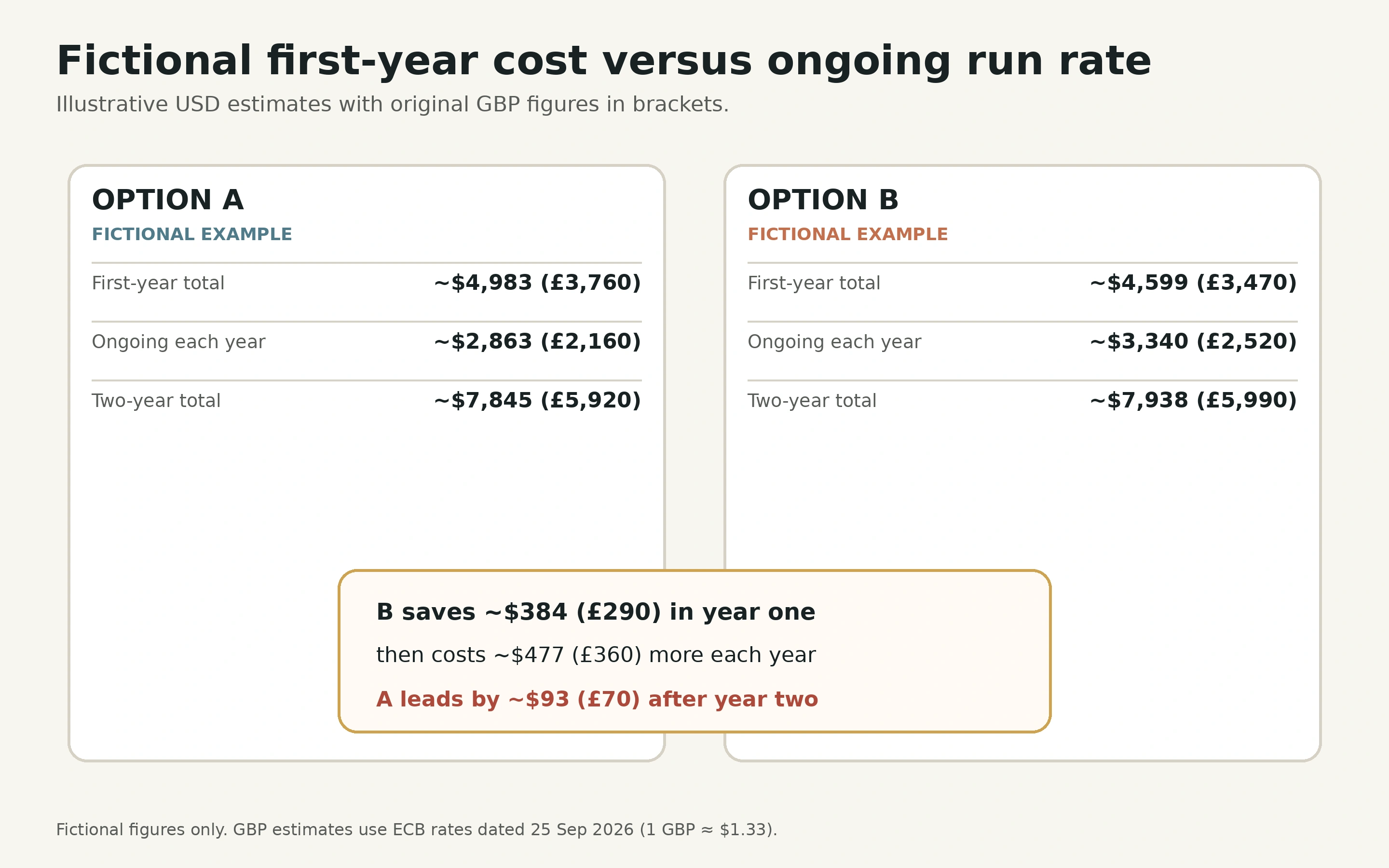
| Item | Option A | Option B |
|---|---|---|
| Required subscription | About $2,385 (£1,800) | About $3,181 (£2,400) |
| Add-ons and usage | About $477 (£360) | About $159 (£120) |
| Setup and migration | About $928 (£700) | About $464 (£350) |
| Training and transition | About $1,193 (£900) | About $795 (£600) |
| Illustrative first-year total | About $4,983 (£3,760) | About $4,599 (£3,470) |
| Illustrative ongoing run rate | About $2,863 (£2,160) | About $3,340 (£2,520) |
In year one, fictional Option B costs about $384 (£290) less, because its setup, migration, training and transition costs are about $861 (£650) lower. But its ongoing run rate is about $477 (£360) a year higher. Carry both forward and fictional Option A is about $93 (£70) cheaper by the end of year two ($7,845 (£5,920) against $7,938 (£5,990)), and the gap keeps widening in its favour.
That doesn't make Option A the right answer. If B's easier set-up means your team actually uses it, that may be worth far more than about $93 (£70). The point is that the first-year number and the ongoing number can tell different stories, so you need to see both before comparing them with workflow value and how long you're likely to stay.
What about the savings?
Software is supposed to pay for itself, but this is where people invent precision. Rather than guessing "we'll save ten hours a week", estimate specific changes:
- administrative hours removed
- fewer missed appointments
- faster quote follow-up
- more complete charging of time and materials
- a shorter time from finishing a job to sending the invoice
- lower cost for separate tools you no longer need
Put a rough number on each, keep it separate from the cash costs above, and treat it as a hopeful estimate rather than a fact.
Questions to put to every provider
Before you pay, ask each one:
- Is the published price inclusive or exclusive of tax?
- Which plan supports the workflow I need?
- How does the price change as users, jobs or locations grow?
- Are payment, messaging or automation fees additional?
- Is onboarding optional, required or included?
- What are the renewal and cancellation terms?
- Can all my important data be exported?
The decision rule
The cheapest product isn't always the best deal, and the most expensive isn't always overpriced. Compare the full first-year number against what you expect to get back: fewer missed appointments, faster invoicing, less admin time and fewer tools to pay for separately. If the sums only work with heroic assumptions about adoption or savings, extend the trial before you commit.
A good next step is to pick two products from our Jobber alternatives guide, fill in the seven categories for each, and see which one still looks good once everything is counted.
Sources
Prices in this guide come from official product and pricing pages. Public prices and currency conversion were rechecked on 27 September 2026. Jobber figures were checked against official pricing information and first-party plan guidance on 27 September 2026. The two-option example is fictional and for illustration only. Use current provider quotes.