
Alternatives
Affordable Jobber Alternatives for Small Businesses
Jobber is a good product. The real question is whether it's the right one for the business you run. Here's how to work that out, and five genuine alternatives worth a trial.
 10 min read
Nothing is wrong with Jobber. It schedules, quotes, invoices and takes payment, and many small service businesses use it every day. But sooner or later a small question starts to nag. You want to add a helper and wonder what that does to the bill. You notice a feature you need sits on a different plan. Or you realise you're paying for a broad platform when you mostly need a simple way to get from quote to payment.
This guide is for that moment. We'll start with why you're looking, because the reason decides the shortlist. Then we'll walk through five genuine alternatives, grouped by the problem each one solves best, with a plain statement for each of when to choose it and when to stay with Jobber. After that you'll see what each one publishes as its price at one, three and five people, and finish with a short way to test your shortlist so the decision comes from your own jobs, not from a spec sheet.
Currency note. Converted prices are approximate USD estimates based on the European Central Bank reference rates for 25 September 2026, when 1 GBP ≈ $1.33. Original GBP prices are shown in brackets. Exchange rates and card-provider rates change, so check the vendor's current billing currency, tax or VAT treatment and checkout total before buying.
First, why are you looking?
People look beyond Jobber for one of three reasons, and each points in a different direction.
Cost or complexity. If you're a solo owner, the answer may not be a bigger tool or a smaller Jobber plan. It may be the cheapest plan of anything that gets a real job from enquiry to paid invoice.
The bill and the team. If you have two to ten workers, how a product charges matters more than what it does. Price every option at one, three and five users, and include the time it takes to move.
A different way of working. Some businesses need a phone-and-dispatch focus, a booking page customers can use at midnight, or a workflow built around repeat routes. That is a fit problem, not a price problem.
Keep your reason in mind. It will tell you which of the next four sections to read first.
What Jobber already does well
Fairness first. Jobber covers scheduling, CRM, quoting, invoicing, job forms, online booking and payments for home-service businesses. Its published annual-billing prices start at $29 a month for Core (one user). Connect starts at $99 for one user and is $149 a month for two to five users. Its general-purpose workflow won't suit every operation, and that is the only reason the alternatives below exist.
One caution: the pricing figures in this guide reflect Jobber's official plan information checked on 27 September 2026. Confirm the current selector, billing commitment and price directly before buying.
If you want the same kind of tool with a different emphasis
Housecall Pro is the closest broad comparison. Like Jobber, it documents scheduling, dispatch, estimates, invoicing, online booking and customer communication. Where it leans differently is on the customer-facing side, with a branded booking page, review management and marketing tools prominent in its current materials. Confirm which of those are included in the plan you'd actually buy, because features vary by plan. Plans are published, and a free trial is available.
Choose Housecall Pro over Jobber if a branded booking page, automatic review requests and marketing tools are high priorities. Stick with Jobber if its booking, client communication and workflow options fit your trial more closely.
If the bill worries you as the team grows
Two alternatives answer this from opposite directions, and the difference between them is worth understanding.
ServiceM8 is a trade-focused job-management platform built around job cards. On its UK plans, every paid plan includes unlimited users, which makes growth easy to model. The catch is a monthly allowance of new jobs, so a busy month can be the limit rather than headcount. It has a Free plan for one user, and its app is optimised for iOS, with a reduced Lite version on Android, so test the exact phones your team uses.
Choose ServiceM8 over Jobber if its unlimited-user UK plan gives you a lower total cost for the features you need. Stick with Jobber if its client communication and online booking perform better in your trial.
Tradify is also built for trades, covering enquiries, quotes, scheduling, job tracking, timesheets, invoicing and payments in the UK, US, Australia and New Zealand. It adds trade-specific tools such as enquiry tracking and subcontractor management. Its UK plans run from about $45 (£34) to about $58 (£44) per user per month, which is simple and predictable for a small, stable team but rises with every hire.
Choose Tradify over Jobber if trade-specific tools matter and per-user pricing is manageable. Stick with Jobber if its plan structure and general home-service workflow suit you better.
If speed on the phone is the whole game
Workiz combines scheduling, dispatch, job management, communication and invoicing, and it markets itself to businesses such as locksmiths, junk removal, appliance repair and towing, where answering and dispatching quickly wins the work. Its price wasn't listed on the page we reviewed, so you'll need to request current pricing and confirm trial availability yourself.
Choose Workiz over Jobber if dispatch and communication speed matter more than client-facing booking or marketing. Stick with Jobber if its booking and broad home-service workflow perform better in your trial.
If your work is a route
GorillaDesk is built for pest control, lawn care and other recurring-route businesses, with route optimisation, recurring billing, automated reminders and industry-specific forms. Here the honest picture is more nuanced than "specialist beats generalist", because Jobber now documents route optimisation and pest-control chemical tracking too. GorillaDesk goes further in describing material-use reports, exact treated areas, long-term chemical records and chemical data on invoices and work orders. So the thing to compare is reporting depth and record retention, not whether the features exist. Plans are published, and a free trial is offered.
Choose GorillaDesk over Jobber if its material-use reporting, treatment-record retention and recurring-route workflow fit your requirements better in a trial. Stick with Jobber if its broader workflow, current pest-control features and plan structure work better for you.
For a deeper look at this pairing, read Jobber vs GorillaDesk.
What the published prices look like
Here is what each product publishes for one, three and five people. Read the units before comparing, because they aren't the same thing.
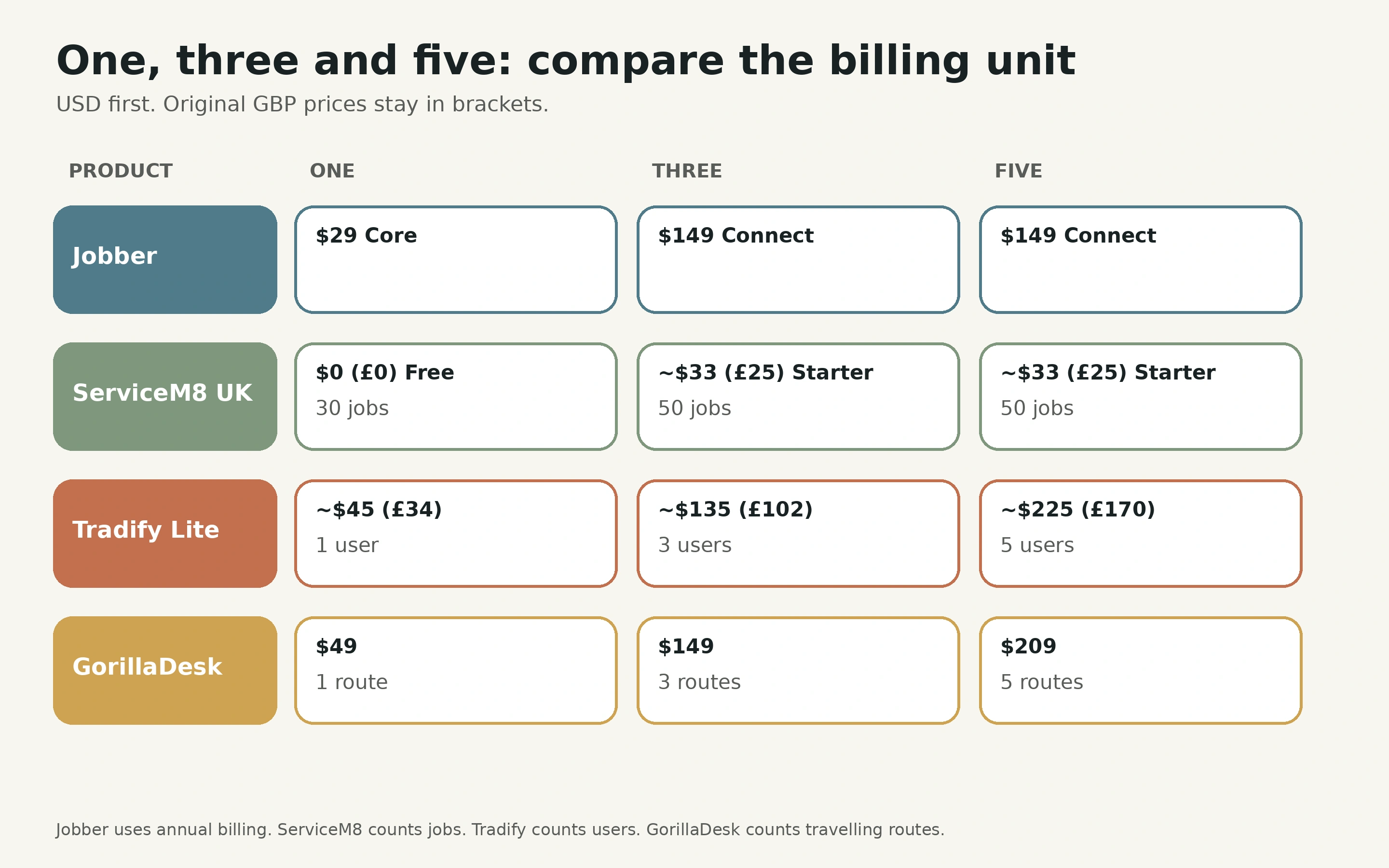
| Product and entry plan | 1 user | 3 users | 5 users |
|---|---|---|---|
| Jobber Core or Connect | $29/month Core | $149/month Connect | $149/month Connect |
| ServiceM8 UK Free or Starter | $0 (£0) Free (30 jobs), or about $33 (£25) Starter | About $33 (£25) Starter (50 jobs) | About $33 (£25) Starter (50 jobs) |
| Tradify UK Lite | About $45 (£34)/month | About $135 (£102)/month | About $225 (£170)/month |
| GorillaDesk Basic | $49/month, 1 route | $149/month, 3 routes | $209/month, 5 routes |
Jobber's figures are on an annual prepaid basis. ServiceM8's paid UK plans allow unlimited users but limit new jobs each month. Tradify charges per user. GorillaDesk charges by independently travelling route, not by every admin login. The currencies differ, so this is not a cheapest-to-dearest ranking. Taxes, payment fees and add-ons are excluded. Our cost guide shows how to add them up.
Also worth knowing about
If quoting and estimating is your main bottleneck, look at QuoteIQ. For plumbing and HVAC specifically, ServiceTitan and FieldEdge both publish offerings, though neither listed public prices on the pages we reviewed, so expect to request a quote.
How to test an alternative
You've now met the candidates. The last step is to let your own work choose between them.
- Map your current workflow. Find the three steps where information is most often lost or rewritten.
- Trial two alternatives with the same script. Use one representative job, including a reschedule, a variation and an invoice.
- Test mobile on the actual devices. Your field team's experience decides whether the tool gets used.
- Calculate the total first-year cost. Include subscription, users, add-ons, payment fees, migration and training.
- Check data portability. Can you export customers, jobs, invoices and photos in a usable format?
- Decide after the trials, not from the spec sheets.
Your next step
Pick the reason you started reading, choose the one or two products from that section, and run the same job through each. If you'd like a structure for it, our guide to choosing simple field-service software sets out a 14-day plan.
Sources
All product facts were checked on 3 September 2026 against official product pages, pricing pages and help documentation. Public prices and currency conversion were rechecked on 27 September 2026. Jobber figures were checked against official pricing information and first-party plan guidance on 27 September 2026. Verify current terms, features, exchange rates and prices directly with each provider.