
Tax and record-keeping
Making Tax Digital and Your Job Software: What Changes
What Making Tax Digital changes for UK sole traders, and how job software fits into the records workflow.
If you run jobs, quotes and invoices in one system, it is natural to ask whether that same system must handle Making Tax Digital for Income Tax. The official guidance makes the answer depend on what software you use to create and store your digital records, and whether records move between products.
This guide is for UK sole traders. It summarises the official guidance checked on 13 October 2026. It is not tax advice. Check your own position with HMRC or an accountant.
Who needs to use it, and when
HMRC says you need to use the service if all of these apply:
- “you’re a sole trader or a landlord registered for Self Assessment”[1]
- “you get income from self-employment or property, or both”[1]
- “your qualifying income is more than the relevant threshold for the tax year”[1]
HMRC says when you need to start depends on qualifying income within a tax year. If it is over £50,000 for 2024 to 2025, you should have started from 6 April 2026; over £30,000 for 2025 to 2026 means starting from 6 April 2027; and over £20,000 for 2026 to 2027 means starting from 6 April 2028.[1] For the first threshold, HMRC says you can still sign up if you have not already done so. HMRC also says it will write to you to confirm when you need to start if your income is above the relevant threshold.[1]
What HMRC means by digital records
“A digital record is a record of your income or expense that is created and stored using software that works with Making Tax Digital for Income Tax.”[2]
HMRC says you must use software to create digital records and, if you use more than one product, digitally link your records.[2] One product can create digital records, send quarterly updates and submit a tax return. If separate products handle record-keeping and submissions, HMRC says to digitally link the record-keeping software and the software that uses those records to make submissions.[2]
That does not mean every job-management or booking tool has to be linked. HMRC says a user does not need to digitally link software that is not used to create digital records of self-employment or property income and expenses, giving booking software and a till system recording sales receipts as examples.[2] The important distinction is the tool’s actual role in your record-keeping. Do not assume a particular job system qualifies or is exempt without checking how you use it and the current HMRC guidance.
Three ways to organise the records
These are workflow descriptions, not HMRC product endorsements.
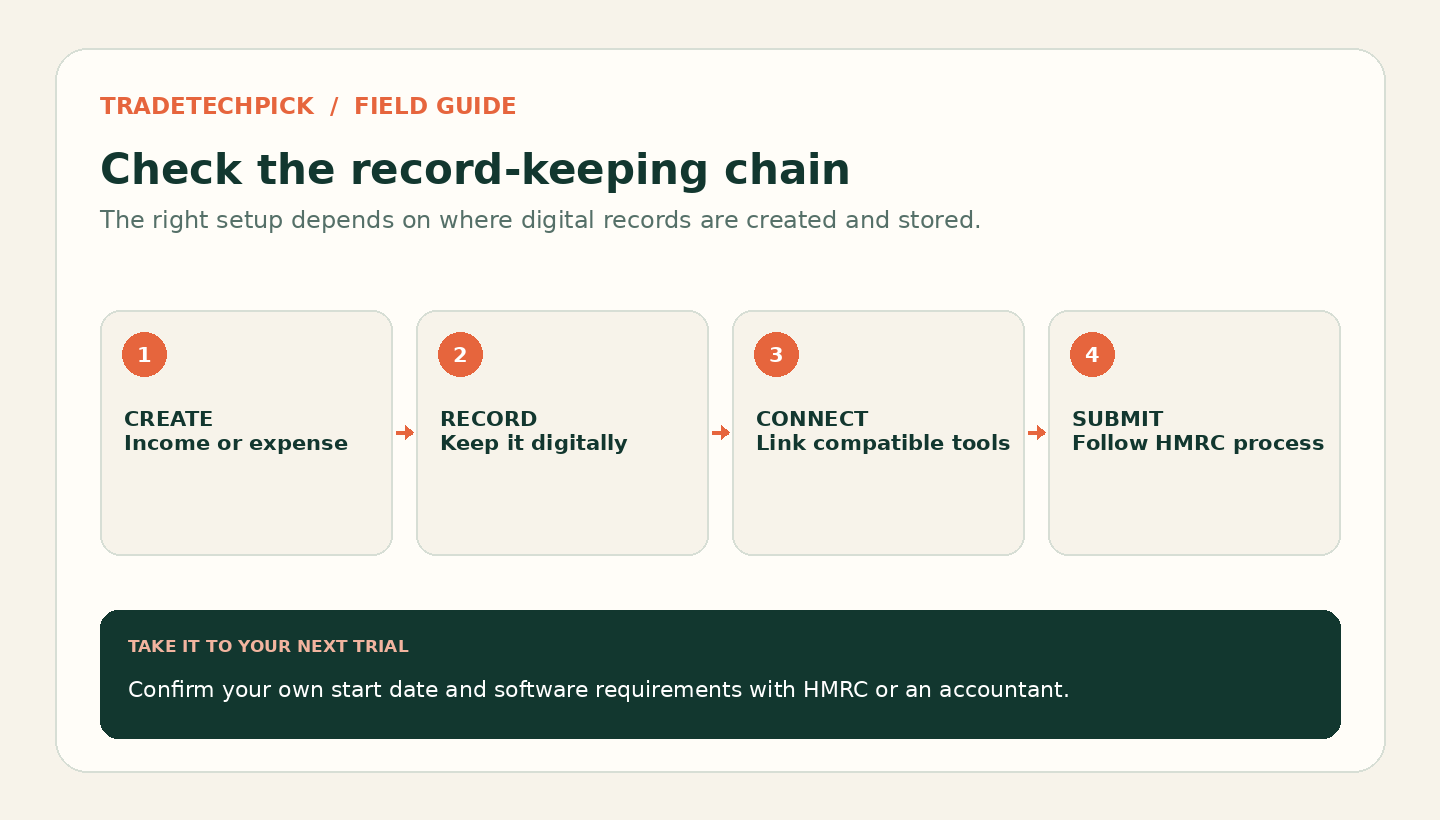
Use one compatible product. HMRC says the software can create digital records, send quarterly updates and submit the tax return.[2]
Use more than one product. If record-keeping and submissions are separate, HMRC requires a digital link. Its examples include linked spreadsheet cells, XML or CSV import and export, downloading and uploading files, automated data transfer, and an application programming interface (API) transfer.[2]
Keep records in spreadsheets and use bridging software. HMRC’s campaign page says spreadsheet users can use “bridging software” to make it work with the new system.[3]
HMRC says that after a digital record has been sent in a quarterly update, you must not manually move it within record-keeping software or to other software. Its guidance specifically warns against using cut and paste or copy and paste to move records.[2]
What each digital record needs
HMRC says to record the amount, the date income was received or an expense incurred, and a category. It says Making Tax Digital for Income Tax uses the same income and expense categories as Self Assessment.[2]
There is a simpler categorisation option in some cases. For sole traders, HMRC says a transaction only needs to be recorded as income or an expense where the relevant rules apply. Simpler categorisation can apply when turnover from a source of self-employment is less than £90,000; if you are unsure whether turnover will reach that level, HMRC says to categorise records in full detail.[2] This is not a universal rule for every business type.
HMRC’s example says that an electrician who is also a driving instructor should create a set of digital records for each business and send separate quarterly updates for each.[2]
Timing, checks and corrections
HMRC gives an example of recording income received on 30 April before the 7 August deadline for that update, and says to create digital records as close to the transaction date as possible.[2] It says there are no penalties for missing a quarterly update deadline for the 2026 to 2027 tax year. That statement is about that tax year, not a reason to leave records until the deadline.[2]
Before sending an update, the accuracy check remains your responsibility. HMRC says it is your responsibility to check that digital records are accurate before sending a quarterly update.[2] A bank connection may not capture everything: some transactions may not appear in full in a bank feed and may need to be created separately in the software.[2]
If you find a mistake, HMRC says you can correct it in software that creates the digital records. If records are in separate record-keeping software, such as a spreadsheet, HMRC says to correct them there and digitally link them to the bridging software.[2]
A practical setup check
- Check your qualifying income and start date using HMRC’s current guidance and tool.[1]
- Identify which product will create and store your digital records.[2]
- If you use multiple products, identify and test the digital link before sending an update.[2]
- If you keep spreadsheet records, check that your bridging software supports the way you will transfer records.[2], [3]
- Test an invoice or expense from its source through to the record-keeping product. This is a practical test, not a claim that HMRC approves a specific integration.
- Decide who will check records for accuracy before each update.[2]
- Keep digital records for the required period. HMRC says to keep them for at least five years after the 31 January submission deadline for a tax year.[2]
The supplied official pages do not establish whether any specific job-software product is compatible, supports a particular accounting integration, or handles Construction Industry Scheme deductions. Check the relevant product provider for those product-specific questions. No CIS-specific software claim is made here.
Sources
Checked 13 October 2026 using first-party HTTP captures. The source-backed statements above are based on the captures’ visible text; search snippets were not used.