
Software Basics
How to Reduce Drive Time Between Jobs (Without Turning Work Away)
The hours you spend driving are the ones nobody pays you for. How to reduce drive time between jobs by changing when you say yes, not just which road you take.
 13 min read
You can reduce drive time between jobs without turning work away, and the biggest savings come from decisions made long before you start the van.
Open a map and look at where you worked last week. Put a pin on every job.
If the pins form a tidy cluster, congratulations. If they look like someone threw a handful of rice across the county, you've just found one of the biggest hidden costs in your business.
Driving is the part of the working day that nobody pays you for. It uses fuel, wears the van, tires you out and shrinks the number of jobs you can finish before dark. Yet most of us treat it as unavoidable, like weather.
It isn't. This guide shows how to reduce drive time between jobs, and the good news is that most of the savings come from decisions you make before you ever start the engine. You'll see why the shortest route is often the wrong thing to optimise, how to set up zone days without losing customers, and a question to ask at the very first phone call that quietly shapes your whole week.
The map doesn't show the real cost of a long drive
Start with a simple sum, using hypothetical numbers.
Say you drive forty minutes to a job and forty minutes back to the next one. That's eighty minutes of driving for one visit. If your time is worth $40 an hour, the drive cost you more than $50 before the vehicle costs.
Now picture a week with twelve jobs and an average of thirty minutes between each. That's six hours behind the wheel, roughly a full working day spent in transit.
This is the number most people never calculate. They remember the work, the customers and the invoices. The driving blends into the background.
But here's what makes it worse. Driving time doesn't just cost you the minutes on the road. It also costs the energy you have left by evening, the tolerance you have for the awkward customer at job number five, and the evening you spend on admin because the day ran late.
Reducing drive time isn't just about saving fuel. It's about buying back time and energy for the work you're actually paid to do.
Why the shortest route is the wrong thing to chase
Most advice on this subject focuses on route optimisation: finding the quickest way to get from A to B to C. That's useful, but it only addresses half the problem.
The bigger issue is which jobs sit on the route in the first place.
Imagine two weeks. In week one, your jobs are spread across the whole area, and even a perfect route takes you back and forth. In week two, the same number of jobs are grouped by area, and an ordinary route is already efficient.
Week two wins, however clever the route in week one. The difference was decided earlier, when you chose which dates to offer to which customers.
Think of it as two levels:
- The route is how you move between the jobs you already have.
- The grouping is which jobs you agree to put on the same day.
Software and maps can help with the first. Only you, or your admin person, can influence the second.
So if you want a large reduction in drive time, don't start with the map. Start with the diary.
The question that shapes your week before you've said a word about dates
Here is the idea that changes the most.
When a customer rings, the usual next question is "when would suit you?" It feels polite and helpful. It's also the moment you hand control of your diary to the customer.
Try this instead. Before you offer any date, ask: "What's your postcode?" or "Which area are you in?"
Then check where you already have work booked. Offer dates that fit with those jobs.
"I'm in your area on Tuesday and Thursday. Which of those suits you better?"
This isn't being difficult. Most customers don't have a strong preference, and are happy to choose from two options. Offering a choice makes the booking easier for them, since they don't have to think about the whole month.
There's a bonus. Customers who are offered "the days we're nearby" often hear it as a sign of a well-run business. It signals that you plan.
Of course, some jobs are urgent and can't wait for a convenient day. Emergencies follow their own rules, and we cover them in our guide to fitting emergency call-outs into a busy diary. But for the planned work, which is most of what many businesses do, area-first booking can cut driving noticeably.
Zone days: giving each part of your patch its own day
The most powerful version of area-first booking is the zone day.
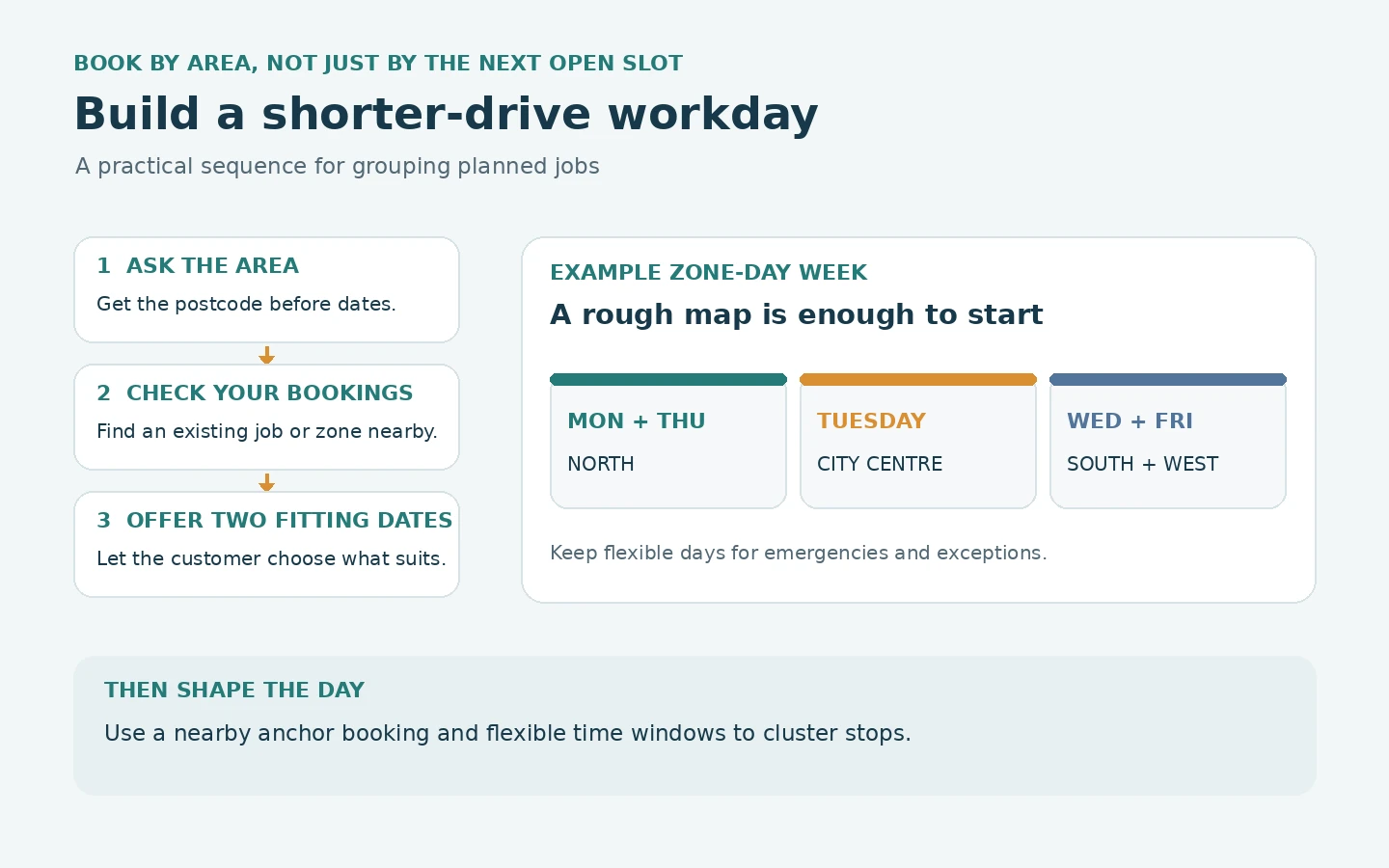
Divide your area into zones, perhaps three or four. Assign each zone to particular days of the week. For instance:
- Monday and Thursday: north
- Tuesday: city centre
- Wednesday and Friday: south and west
When customers ring, you offer the next available day in their zone. You don't need a complicated system. A rough map with colours on it is enough.
Why does this work so well?
- Predictability. You know where you'll be, so you can plan van stock, parking and which customers to bundle.
- Fewer cold starts. Each time you travel into an area after being elsewhere, you pay the "show-up cost" again. Staying in one zone avoids it. Our guide to the minimum call out charge explains the idea.
- Better chances of squeezing in extras. If you're already in the north and a neighbour needs a quick job, you can fit it in.
- Word-of-mouth bonus. Neighbours talk. If you're often on their street, they notice, and recommendations spread locally.
There are trade-offs, of course. Customers can't always take the day you offer. Some will wait longer than they'd like. That's why zone days work best as a default rather than a rule. You can break them for emergencies, regular customers and valuable jobs.
Start gently. Try zone days for the planned work, and keep one or two flexible days for everything else.
The anchor job: let one booking pull others toward it
Another technique doesn't require rearranging your whole week. It's called the anchor job.
An anchor is a booking that you've already agreed, ideally a larger one, in a particular area on a particular day. Once you have it, you build the rest of that day around it.
When the next customer rings, you check: "Do I have an anchor near them?" If you do, offer that day.
The anchor does more than save travel. It gives the day a shape. Instead of an open diary with gaps, you have a fixed point and a cluster around it.
Over time, you can encourage anchors on purpose. When you quote a larger job, think about which days it makes sense for, given where else you're booked. When you finish a job, ask neighbours if they have anything small that needs doing. A small job beside an anchor is worth much more than the same job on its own.
You'll also start to see "dead days", days with no anchor and a scattering of small jobs. Those are the days where driving eats the most. Once you can see them, you can try to fill them with something more worthwhile or leave them for admin and rest.
Time windows are a cheap trick that saves a lot of driving
Many customers expect an exact time. "Can you come at ten?" The trouble is that exact times make routes rigid. One late job and the whole day shifts. Worse, exact times often force you to cross town and back.
A kinder, more flexible approach is the time window. Instead of "ten o'clock", you say "between nine and twelve" or "in the morning".
Windows help in three ways.
They give you room to group jobs. You can reorder within the window so that nearby jobs sit together.
They absorb overruns. If the first job takes longer, the second still falls within its window.
They reduce the pressure. You don't spend the day racing the clock.
Customers are often more accepting of windows than tradespeople expect, especially if you send a "on my way" message when you set off. That small message does a lot of work: it tells the customer you're coming and when, without a promise you can't keep.
Where customers truly need a fixed time, such as when they have to be at home for access, you can offer it. But make exact times the exception, not the default, and keep a note of which jobs have fixed times so that you can plan around them.
Cheap ways to plan a route on paper, on a phone or in software
Once you have the jobs grouped, the route itself can be simple.
The paper method. List the day's addresses. Mark each on a printed map or a free map app. Look for the natural loop and work around it. It takes five minutes and works surprisingly well for up to six or seven stops.
The phone method. Most phone map apps let you add multiple stops and suggest an order. Use it as a sense-check rather than gospel. Apps often can't know that the school run makes a certain road slow, or that a particular customer's drive is hard to park in.
The software method. Some job-management tools show a day's jobs on a map or suggest a route. Features differ between products and plans, so check with each provider and test with a real day's schedule. Look for how easy it is to drag a job to another time and see the effect on the map.
Whichever you use, remember the earlier lesson. Route tools can't rescue a badly grouped diary. They work best when you've already placed jobs sensibly.
Our guide to choosing simple field-service software includes a trial plan that tests scheduling with realistic days, so you can see what a tool does for your own patch.
The sneaky time-wasters that aren't on the road
Drive time is the visible part. A few invisible time-wasters sit around it.
Going back for parts. A missing fitting can add an hour to a job. Better van stock reduces return trips. Our guide to keeping van stock under control covers it.
Returning to the yard between jobs. If you do this because it's habit, ask whether you truly need to. Sometimes a different loading routine avoids it.
Waiting for access. If a customer isn't in when you arrive, you lose time. A "on my way" message and a window reduce this.
Parking. In towns, finding a space can take as long as the drive. Note which customers are hard to park near, and allow time.
Lunch in the wrong place. Stopping in a spot far from the next job costs more than it seems.
Each of these costs ten or fifteen minutes. A few of them in a day add up to an hour. It's worth keeping a note for a week and seeing which ones happen most.
How to try this for a month without upsetting anyone
Changing the way you book can feel risky. What if customers don't like it? What if you turn away work?
Treat it as an experiment rather than a policy change. Here's a gentle plan.
Week one: observe. Map every job for a week. Note drive times, and mark which gaps felt wasteful.
Week two: add the postcode question. When customers ring, ask for their area before offering dates. Don't change anything else.
Week three: offer two dates. Based on where you already have work, offer two options. Notice how many customers accept.
Week four: try one zone day. Pick a day and an area. Offer it as the default for that area, and see what happens.
At the end of the month, compare. How many hours did you spend driving? How many jobs did you do? Did any customers push back?
Most people find the pushback is smaller than expected. The customers who truly need a different day will say so, and you can accommodate them. The rest happily take the date you suggest.
Keep a note of the numbers, because they're the best argument for sticking with the change. If you cut even an hour of driving a day, that's an extra day's work every week or so.
When to say no to the far-away job
Eventually, you will meet a job that is perfectly good but too far away to make sense.
It's tempting to take it anyway, because work is work. But a job that adds two hours of driving for a small payment is often a net loss, even if the customer is lovely.
You have several options.
Charge for the distance. A higher minimum, or a travel charge, reflects the real cost. If the customer still wants you, fine.
Offer a specific day. "I'm out that way on the last Friday of the month. If that suits you, I can fit you in." This turns an awkward job into an anchor.
Recommend someone closer. A trusted colleague nearer to the customer helps them and keeps goodwill. They may return the favour.
Decline politely. "I'm sorry, that's outside the area I cover. I'd rather tell you now than let you down."
Our guide on saying no to jobs and customers goes into how to do this gracefully.
The point isn't to refuse work. It's to decide, deliberately, what your patch is, so that your week is built around it.
Driving and scheduling questions, answered straight
How much driving is normal for a trade business?
It varies by trade and area. A rural business will drive more than an urban one. A useful measure is your own: track the hours for a few weeks, then try to bring the average down.
Do I need software to plan routes?
No. Paper and a phone map work for small teams. Software can help when you have several vehicles or many stops. Check features and plans with each provider.
What about electric or hybrid vans?
Vehicle choice affects running costs, but it doesn't change the time you spend driving. Reducing the number of miles helps whichever vehicle you use.
What if customers insist on a specific day?
Offer it if the job is valuable or the customer is regular, and consider a slightly higher charge if it takes you out of your way. Otherwise, offer two alternatives that suit your route.
How do I keep a team's routes sensible?
Give each person a zone for the day. Share the schedule where everyone can see it, and review it weekly.
Tomorrow's first enquiry is where the change starts
The most effective way to reduce drive time between jobs isn't a smarter route. It's a smarter diary.
Ask for the postcode before you offer dates. Group jobs into zone days. Let anchor jobs pull neighbours toward them. Use time windows to give yourself room. Charge or decline when a job is too far to make sense.
Your next step is a small one. Tomorrow, when a new enquiry comes in, ask where they are before you ask when they want you. See what dates that suggests. It may be the first step toward a week with fewer miles and more finished jobs.