
Software migration
Moving From Spreadsheets and Paper to Field Service Software
Plan the data clean-up, team training and cutover so the new system replaces old admin instead of adding to it.
 8 min read
Paper job sheets, a spreadsheet and a calendar can each work on their own. The friction starts when the same customer, appointment or payment status has to be remembered in several places. Moving to field-service software is not just an import: it is a change to where the business records work and how the team updates it.
The safest approach is to decide what needs to move, test a representative job, and choose a clear cutover point. Avoid keeping the old system as a second permanent source of truth. If a short parallel check is needed for confidence, define its end date and the one system that staff must update each time.
Start with the records you need
Before importing anything, make a protected copy of the original files. Then decide which records are needed for live work, which should be kept only as an archive, and which are duplicates or incomplete. Do not delete customer history simply because it is old; retain it when tax, warranty, contractual or service needs require it.
- Use one row per customer and separate columns for names, contact details and addresses.
- Review duplicate records and agree which entry is authoritative before importing.
- Standardise obvious formatting differences, but preserve meaningful notes and access instructions.
- Separate current customers and open jobs from historical records if the software or import process handles them differently.
- Keep the untouched original and a dated copy of the cleaned import file.
Import assistance is provider-specific. GorillaDesk says its support can help move data from another system and describes importing general customer information with a starting balance; it also states that complete past service and billing history cannot be imported.[1] ZenMaid says its team can format and upload existing client information and import contacts and calendar data.[2] These examples do not establish what another vendor will import, or what your particular account includes. Ask for the supported fields, file format, fees and limits in writing.
Test one real job before moving the whole business
Choose a representative customer and follow their work from first contact through completion and payment. Test a new enquiry, quote, booking, schedule change, field note, invoice and payment status. Include a real edge case, such as a return visit or a customer with two service addresses. Use test communications or an internal record so the trial does not accidentally message a customer.

Compare the result with the original record. Check that the address, contact route, job history, agreed price, attachments and next action are present and understandable. If something important is missing, find out whether it can be imported, entered manually, exported elsewhere or retained in a read-only archive. Do not assume that a successful customer import also moves appointments, invoices, attachments or complete job history.
A two-week cutover plan you can adapt
Two weeks is a planning template, not a promise that every business can migrate in that time. Extend it if records are complex, staff need more training, the import needs vendor support or the test exposes missing data. Set the cutover only after the test job and backup are satisfactory.
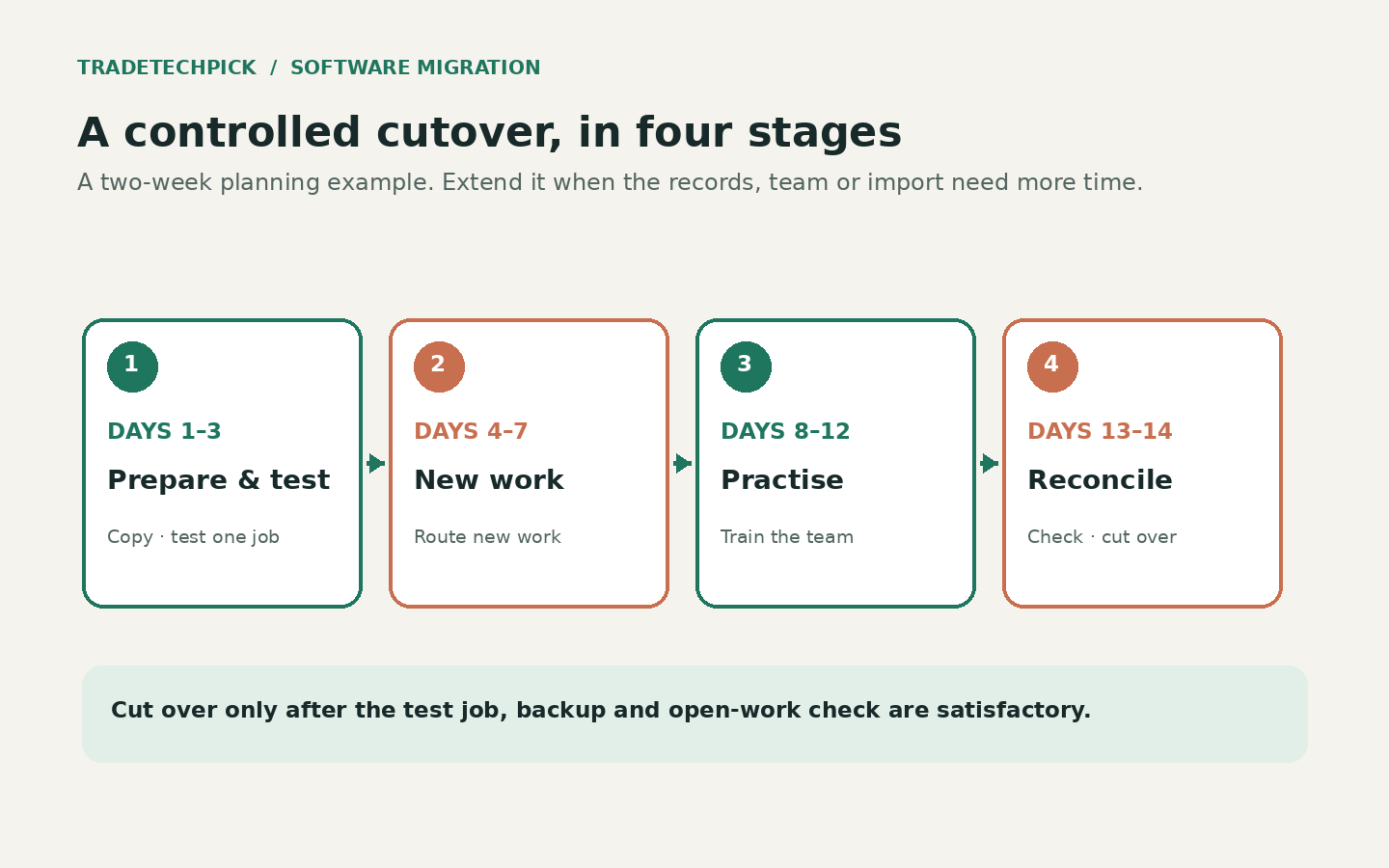
Days 1–3: prepare and test
Clean a copy of the customer list, configure services and permissions, and run the representative job. Keep the original system available. Write down what did not transfer and resolve the gaps before relying on the new record.
Days 4–7: use it for new work
If the test is sound, direct new enquiries and newly accepted work into the new system. Leave already-booked work in its existing record until it is completed or deliberately transferred. Tell everyone which system to check, and avoid entering the same update in two places indefinitely.
Days 8–12: practise with the people doing the work
Have office and field staff use the exact steps they will need: open today's job, find the address and instructions, add a note or photo, record a change and hand the job back to the office. Keep the training short and based on real tasks. Name one person to collect questions and decide how corrections are recorded.
Days 13–14: reconcile and cut over
Review upcoming appointments, open quotes, balances and incomplete jobs against the source records. Transfer or archive what remains, tell customers if invoices or payment links will look different, and confirm the team's cutover date. On that date, use the new system as the working record; keep the protected export as a fallback, not a second daily workflow.
Decide what happens when the signal drops
Before relying on a mobile app, check which actions work without a connection and what syncs later. Test it in the conditions your team actually encounters. If a note, signature, photo or payment cannot be captured offline, agree on a safe fallback and when the office will enter it. Do not discover an essential offline limitation on a live job.
Make the first invoices recognisable
Customers may notice a changed sender name, layout or payment link. Before the first system-generated invoice, tell them what to expect and how to check that a payment request is genuine. Send a test invoice internally, verify the reply-to address and payment destination, and make sure staff know where to find the status afterward.
Do not let the software become one person's memory
A system only helps the team if important information is recorded where the next person can find it. Agree what belongs in a job note, who updates the appointment after a change, and how a completed job is marked. Start with a few simple rules; review them after the first week of actual use.

Before you set the date
- You have an untouched backup and know how to retrieve it.
- A representative customer and job have passed the end-to-end test.
- You know what did and did not transfer, including open jobs and future appointments.
- Everyone knows which system is authoritative and the cutover date.
- Customers have been told about any changed invoice or payment process.
- There is a fallback for poor signal, and someone owns the first-week questions.
If any answer is no, move the cutover date rather than rushing a partial migration. Once the new workflow is working, our small-business software selection guide can help check whether the chosen product still fits; the solo-tradesperson guide covers a one-person operation.